AI RFQ Analysis: How AI Can Help Compare Supplier Bids
Comparing supplier bids sounds straightforward: collect the quotations, look at the prices, and choose the best option. In practice, procurement teams often spend much of their time before they can even start comparing.
One supplier sends an Excel file. Another sends a PDF. A third includes freight in the unit price, while the next lists it separately. Technical specifications, delivery commitments, payment terms, and exclusions may be buried in different sections of each document.
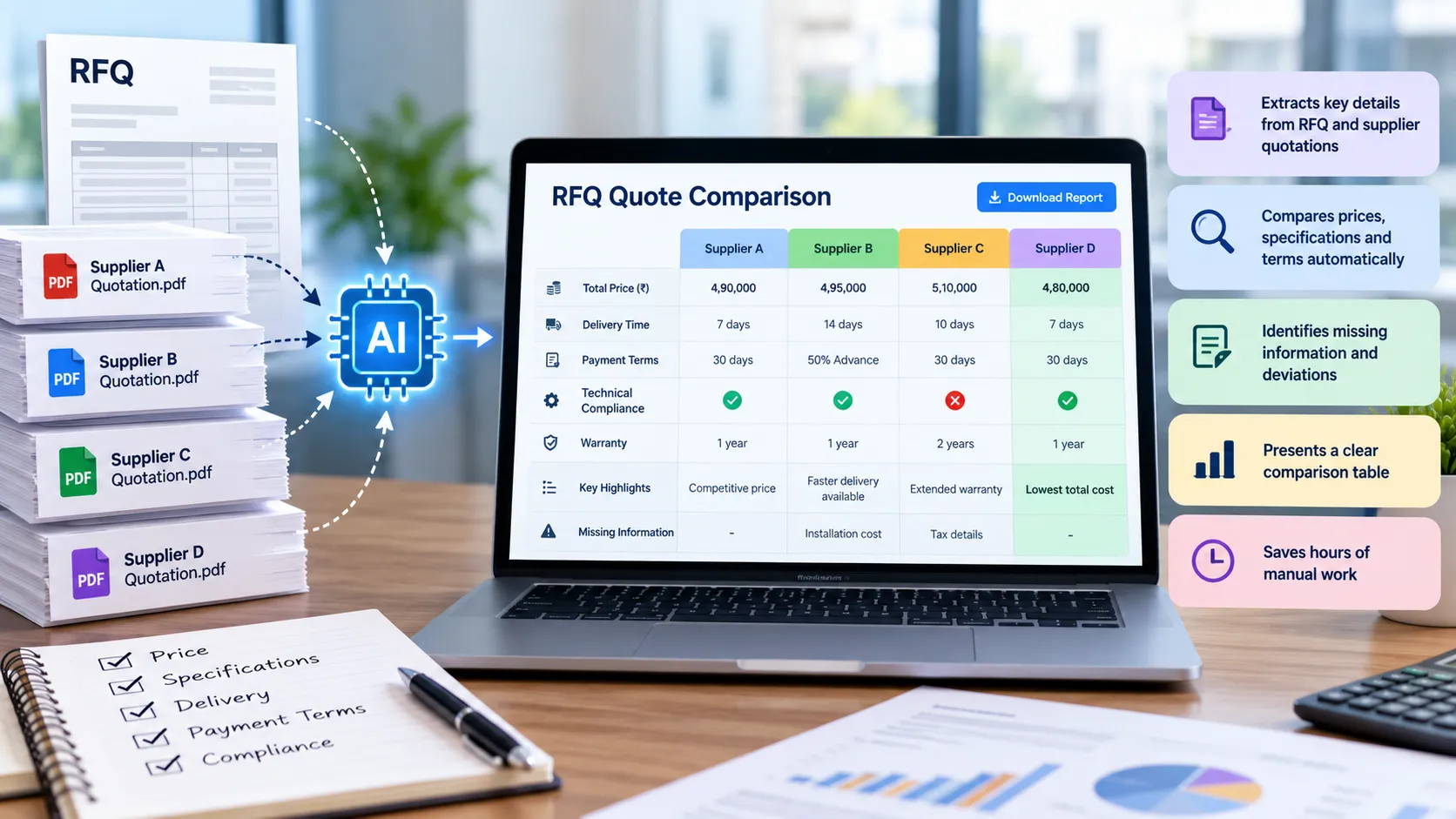
This is where AI RFQ analysis can help. AI-assisted tools can help extract and organize information from supported quotation documents, making it easier for buyers to review differences and spot details that need attention.
AI does not make the purchasing decision for you. Its value is in reducing repetitive document work and giving procurement teams a clearer starting point for evaluation.
In this guide, we explain how AI can help compare supplier bids, where it can fall short, and how to assess whether an AI-assisted workflow is suitable for your team.
What is AI RFQ analysis?
RFQ stands for Request for Quotation. A buyer sends an RFQ to potential suppliers to request pricing and other details for specific goods or services.
AI RFQ analysis uses artificial intelligence to help interpret information in RFQs and supplier quotations. Depending on the tool, document types, and configuration, it may help extract key fields, organize bid details, compare supplier responses, or flag information that appears missing or different.
A typical analysis may consider:
- Item descriptions and quantities
- Unit prices and quoted totals
- Discounts, freight, and additional charges
- Delivery lead times
- Payment terms and warranties
- Technical specifications and exceptions
- Missing information that requires clarification
Capabilities vary from one solution to another. Some tools focus on extracting data from documents, while others support a broader comparison workflow. Always check what a tool actually supports before using it with live procurement documents.
Why comparing supplier bids manually can be difficult
Manual comparison is manageable when there are only a few short, consistent quotations. The work gets harder when the quotes differ in format or contain many line items.
1. Suppliers use different document formats
A supplier may send a spreadsheet, another a PDF, and another a scanned document. Buyers have to locate the relevant values and transfer them into a common comparison sheet.
2. Prices are not always directly comparable
One supplier may include transportation in the quoted price, while another charges it separately. Discounts, packaging, installation, minimum order quantities, and taxes can also affect the final comparison.
3. Important conditions can be easy to miss
A quotation may include a longer delivery lead time, a shorter warranty, an advance payment requirement, or an exclusion that changes the value of the offer.
4. Manual copying can introduce errors
A misplaced decimal, incorrect quantity, or missed line item can distort the comparison. The more quotations a buyer handles, the more important a consistent checking process becomes.
5. The reasoning behind a decision needs to be recorded
Procurement teams may need to explain why a bid was selected, what exceptions were accepted, or which clarifications influenced the recommendation. A price table alone may not capture that context.
How AI can help compare supplier bids
AI is most useful when it helps organize information and directs the buyer’s attention to details that deserve review. The exact capabilities depend on the system and the documents provided.
1. Extract information from supplier quotations
Instead of manually locating every field, an AI-enabled document workflow may extract values such as supplier name, item description, quantity, unit price, quoted amount, delivery time, and payment terms from supported files.
The extracted values should be checked against the source quotation. Poor scans, unclear tables, unusual layouts, handwritten notes, and ambiguous wording can all affect extraction quality.
2. Organize bids into a common comparison view
Once the relevant information has been extracted, a tool may arrange supplier responses in a consistent structure. This can help buyers review the same fields side by side rather than opening each document repeatedly.
For example, a comparison view could include:
| Evaluation field | Supplier A | Supplier B | Supplier C |
|---|---|---|---|
| Unit price | ₹950 | ₹920 | ₹980 |
| Delivery | 7 days | 14 days | 7 days |
| Payment terms | 30 days | 50% advance | 30 days |
| Warranty | 1 year | 1 year | 2 years |
| Freight | ₹10,000 | ₹25,000 | Included |
Illustrative example only. The values are not actual supplier offers.
This view makes differences easier to spot, but it does not prove that the bids are equivalent. Buyers still need to confirm that the suppliers quoted the same specifications, quantity, delivery location, and scope.
3. Help identify missing information
A supplier may leave a field blank or omit a detail requested in the RFQ. A comparison workflow can help flag missing values so the buyer can follow up.
For example, the team may need to clarify whether freight is included, whether a warranty applies to the full product, or whether a quoted delivery time starts after the purchase order or after advance payment.
A blank field should be treated as unknown—not as zero cost or automatic acceptance.
4. Highlight differences in commercial terms
AI-assisted review may help surface differences in delivery, payment, warranty, and other commercial terms. These differences can matter even when one supplier has the lowest price.
For example, a lower quote may require a large advance payment or offer a longer delivery timeline. The buyer can use these differences to ask better questions and assess the overall offer.
AI-generated summaries should not replace reading the original terms, particularly when wording is ambiguous or has contractual significance.
5. Reduce repetitive preparation work
When the team regularly receives quotations in supported formats, extracting and organizing the same fields can consume considerable time. Automating part of this work may allow buyers to spend more time reviewing exceptions, negotiating, and coordinating with technical stakeholders.
The actual time saved depends on document quality, quotation complexity, and how much manual verification remains necessary. Measure this with a representative set of real documents rather than assuming every RFQ will be processed automatically.
Example: How AI-assisted RFQ analysis could work
Imagine a manufacturing company needs 500 components and receives quotations from three suppliers.
- Supplier A offers a moderate unit price, separate freight charges, and delivery in seven days.
- Supplier B offers the lowest unit price but charges more for transportation and requests an advance payment.
- Supplier C includes transportation and offers a longer warranty, but the buyer needs to confirm whether the quoted specification matches the requirement.
An AI-assisted workflow might extract the relevant values, place them into a common comparison view, and highlight fields that are missing or different.
The procurement team would then:
- Check extracted values against the original quotations.
- Confirm that all suppliers quoted the same requirement and quantity.
- Calculate comparable total costs using consistent assumptions.
- Review technical exceptions and commercial terms.
- Request clarification where needed.
- Document the recommendation and obtain the required approvals.
The tool helps prepare the comparison. The procurement team remains responsible for validating the evidence and making the decision.
AI RFQ analysis versus an Excel comparison sheet
Excel remains a useful option for small RFQs and well-structured data. AI-assisted tools may be helpful when the work of reading and transferring information from documents becomes a bottleneck.
| Task | Excel-based process | AI-assisted workflow |
|---|---|---|
| Enter quote data | Usually entered or copied manually | May extract data from supported documents |
| Compare structured numbers | Formulas can calculate totals and differences | May organize extracted values for review; calculation features vary |
| Handle different document layouts | Requires manual reading and entry | May process supported formats, with verification |
| Identify missing fields | Can use checks and conditional formatting if configured | May flag apparent omissions, depending on the tool |
| Understand technical equivalence | Requires human review | Still requires human review |
| Interpret contract terms | Requires careful reading | May help surface differences, but source terms must be checked |
| Final supplier selection | Procurement team decides | Procurement team decides |
The practical choice is not necessarily Excel or AI. A team may use AI to help extract information, Excel or another system to calculate and structure the comparison, and human review to validate the result.
What AI cannot reliably decide on its own
AI can be useful, but it has limits. A procurement team should not assume that an AI-generated comparison is complete or correct without verification.
It may misread a document
Scanned PDFs, low-resolution tables, complex layouts, and inconsistent formatting can lead to missing or incorrect values.
It may compare items that are not equivalent
Similar product descriptions do not guarantee matching specifications. Material grade, dimensions, certification, service scope, and quality requirements may need expert review.
It may miss context in commercial terms
A phrase in a quotation may depend on the RFQ, a separate agreement, or an earlier clarification. The buyer should check the original wording and relevant documents.
It may not calculate the true total cost automatically
A tool may extract prices without knowing how your organization handles taxes, discounts, freight, currency conversion, or other charges. Make sure the calculation method is explicit and consistent.
It does not replace approvals or supplier due diligence
Budget authority, supplier qualification, conflicts of interest, legal review, and internal purchasing policies remain part of the process. AI output should not bypass required controls.
How to evaluate an AI RFQ analysis tool
Before introducing a tool into your procurement process, test it on representative quotations and review more than the final comparison table.
1. Check file support. Confirm which formats are supported and whether scanned PDFs or multi-page documents can be processed.
2. Verify extraction accuracy. Compare the output with the original quotations. Pay particular attention to decimal places, quantities, units, currencies, discounts, and additional charges.
3. Check how differences are presented. The tool should make missing fields and exceptions visible rather than silently treating them as acceptable.
4. Understand the calculation rules. Confirm how totals are calculated and whether freight, tax, discounts, and other charges are handled consistently.
5. Review data handling. Before uploading supplier quotations, understand where documents are processed, how they are stored, who can access them, and whether they are retained or used for other purposes. Follow your organization’s confidentiality and security policies.
6. Keep a human review step. Establish who verifies the comparison, who resolves exceptions, and who approves the final recommendation.
7. Measure the workflow. Compare the time needed to prepare and verify a set of quotations manually versus with the tool. Also track corrections, missed exceptions, and user feedback.
Explore RFQ Quote Compare AI
If your team regularly compares supplier quotations, you can explore RFQ Quote Compare AI.
The page introduces our RFQ quote comparison MVP for evaluating an AI-assisted approach to supplier bid comparison. Review the current capabilities and check whether they fit your document formats and process. Because this is an MVP, validate the output and confirm the data-handling arrangements before using it with sensitive or high-value procurement documents.
The goal is straightforward: reduce repetitive comparison work while keeping buyers in control of the decision.
Frequently asked questions
What is AI RFQ analysis?
AI RFQ analysis uses artificial intelligence to help extract, organize, and review information from requests for quotation and supplier bid documents. Capabilities vary by tool, and the results should be verified against the original documents.
Can AI compare supplier quotations in PDF and Excel formats?
Some tools support multiple document formats, but support varies. Confirm the formats your chosen tool accepts, including whether it can process scanned PDFs, and test it with the types of quotations your suppliers actually send.
Can AI automatically select the best supplier?
AI can help organize prices and highlight differences, but the lowest price is not always the best offer. Supplier selection may require technical review, total-cost calculations, risk assessment, commercial judgment, and internal approvals.
Is AI-based supplier bid comparison better than Excel?
It depends on the workflow. Excel is effective for structured data and transparent formulas. AI-assisted tools may reduce manual extraction and organization when quotes arrive in different supported formats. Many teams can combine both approaches.
How can I check whether an AI-generated comparison is accurate?
Compare the extracted values with the original quotations, verify the cost calculations, check technical and commercial exceptions, and document corrections. Test the tool on representative documents before relying on it for live decisions.
Is it safe to upload supplier quotations to an AI tool?
That depends on the tool’s data handling, security controls, retention policies, and your organization’s requirements. Review these details before uploading confidential supplier pricing, contractual information, or other sensitive documents.
Final thoughts
AI can make supplier bid comparison more manageable by helping extract quotation details, organize them in a common view, and draw attention to missing information or differences. It is most valuable when it reduces repetitive work without hiding uncertainty or removing human oversight.
Start with a clear comparison process, verify the source data, and keep a record of the reasons behind the final decision. If manual document preparation is taking too much time, test whether an AI-assisted workflow can improve the process for your team.
To explore the approach, visit RFQ Quote Compare AI.